Angular的NgFor即将弃用?一招解决!
这周上班来发现我VsCode里关于NgFor、NgIf、NgSwtich相关的代码全都被打上了横线!天塌了! ! (https://api.flowersink.com/uploads/blog/images/compressed 1754900377287.png) 查看警告信息看到了这样一段话: NgForOf'
这周上班来发现我VsCode里关于NgFor、NgIf、NgSwtich相关的代码全都被打上了横线!天塌了!
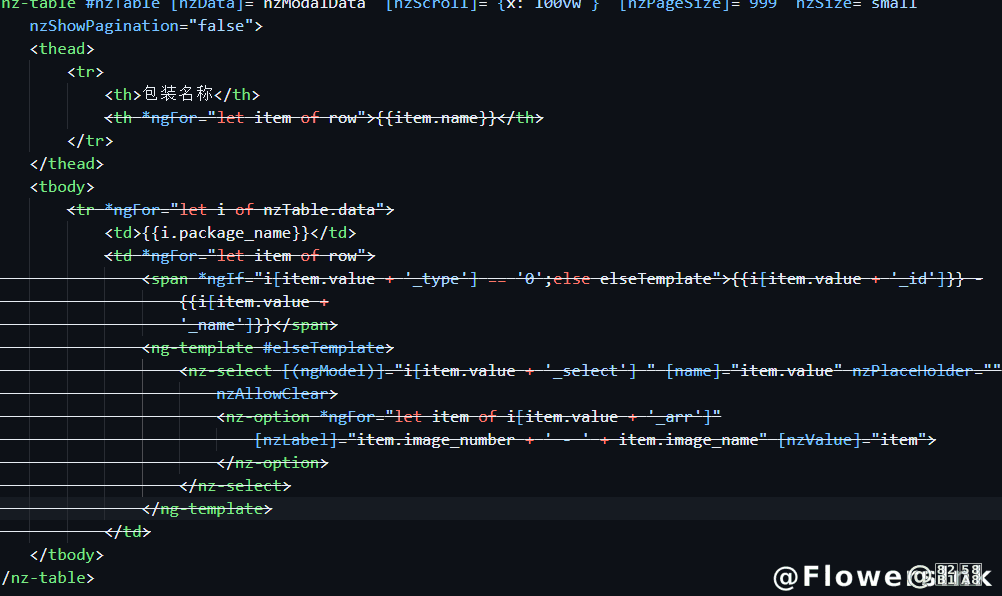
查看警告信息看到了这样一段话:NgForOf' is deprecated
通过Angular官方文档得知,Angular将会在v22版本中弃用这三个语法,虽然时间尚早,但这满屏的横线也严重影响了本花的工作体验啊!于是开始着手寻找解决办法。
在尝试了正则表达式脚本等各种方法后,终于找到了最适合、也是最简单的方法:Angular官方自动化迁移工具
使用
执行命令
ng generate @angular/core:control-flow
这个指令会自动执行以下操作
- 基础循环语法转换
- 索引变量(自动转换为
$index) - 空列表处理(
@empty块) - 移除多余的
ngFor导入
修复**track**表达式
执行完成后我们会发现这个指令不会对**track**相关的表达式产生任何操作,所以还需要执行一个脚本来完成最后的步骤。
创建一个fix-track.js文件
const fs = require('fs');
const path = require('path');

const HTML_FILES = [
  path.join(__dirname, 'src', 'app'),
];

// 自动推断
function getTrackExpression(itemName) {
  const commonIds = ['id', 'key', 'code', 'uuid', 'name'];
  const checks = commonIds.map(id => `${itemName}.${id}`).join(' || ');
  return checks || '$index';
}

// 替换
function migrateNgFor(content) {
  return content.replace(
    /@for\s*\((.*?)\s+of\s+(.*?);\s*track\s+([^;]+)(.*?)\)\s*\{/g,
    (match, itemDef, collection, oldTrack, rest) => {
      const itemName = itemDef.trim().split(/\s+/)[1];
      return `@for (${itemDef} of ${collection}; track ${getTrackExpression(itemName)}${rest}) {`;
    }
  );
}

// 遍历
HTML_FILES.forEach(dir => {
  fs.readdirSync(dir, { recursive: true })
    .filter(file => file.endsWith('.html'))
    .forEach(file => {
      const filePath = path.join(dir, file);
      let content = fs.readFileSync(filePath, 'utf8');
      const newContent = migrateNgFor(content);
      if (newContent !== content) {
        fs.writeFileSync(filePath, newContent);
      }
    });
});
然后在终端执行命令
node fix-track.js
该命令会执行以下操作
- 自动识别
@for中的循环变量名(如item) - 生成智能
track表达式(优先尝试id/key/code等常见字段) - 保留原始索引声明(
let i = $index)
到这一步就完成了。
验证
使用指令ng build或者ng test进行测试。
验证无误后我们可以看看代码前后对比。
<!-- 转换前 -->
<nz-option *ngFor="let item of packageList; let index" ...></nz-option>

<!-- 转换后 -->
@for (item of packageList; track item.id || item.type; let index = $index) {
  <nz-option [nzLabel]="item.type" [nzValue]="item"></nz-option>
}